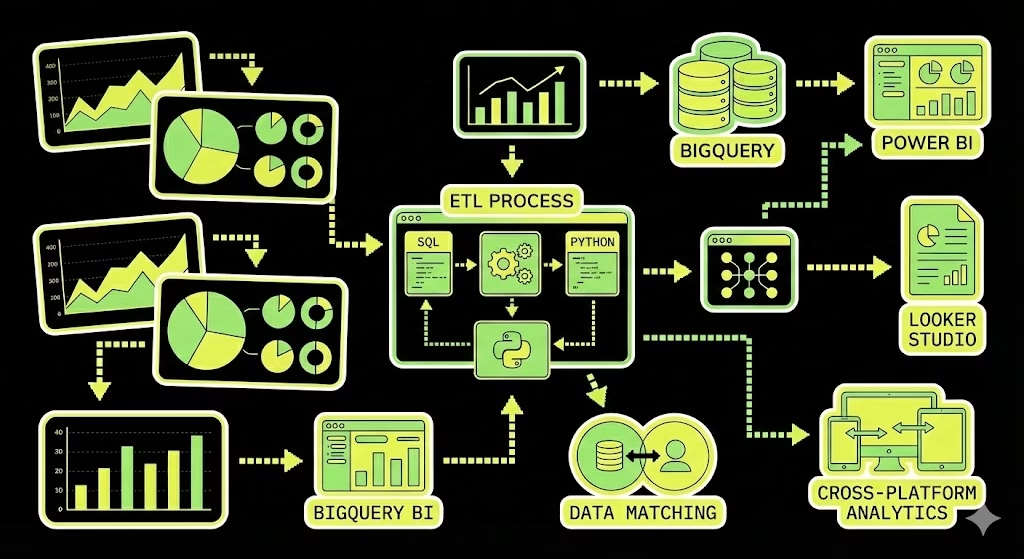
“There’s nothing more fun than exporting 100,000 rows of logs per day via the Matomo Cloud API.”
At some point GA4 + cookie banners stop giving you enough signal for real analysis. And when a client / business / you need clean data down to every click, Matomo often looks like a solid plan.
But if we’re being honest: once you want segmentation, custom attribution logic, proper cohorting, joining with CRM, or anything that smells like “serious analytics” – Matomo’s default dashboards won’t carry it. You’ll end up in raw data. And with Matomo Cloud raw data means one thing: either you export via API… or you don’t export at all.
This is how I built the pipeline to land Matomo raw logs in BigQuery, model them properly, and then consume them in Looker Studio / Power BI – plus where it hurt.
What Matomo Cloud actually gives you
Matomo Cloud doesn’t give you direct database access. So for raw user-level data (visits + clickstream), you’re basically living in one endpoint:
Live.getLastVisitsDetails– exports visits and their actionDetails (pages, events, downloads, etc.) for a given date/site. Matomo explicitly recommends it for exporting raw data to a warehouse.
A key detail most people miss:
filter_limit=100is just an example/default – it’s not “the maximum forever.” For large exports, Matomo recommends paging and exporting chunks (example: 10,000 records at a time) usingfilter_limit+filter_offsetuntil nothing is returned.
Also:
- Each visit includes up to 500 actions in the export (unless you change server config – which is usually not something you can freely do on Cloud).
And yes, Matomo Cloud will throttle you if you go wild:
- Live resources are rate-limited (example rules: 200 requests/min for
module=live/method=live), and raw-data endpoints also have a limit on simultaneous queries. If you hit it, you’ll see HTTP 429.
So… welcome to ETL.
Two real options
Option A – DIY ETL via API (cheap in money, expensive in nerves)
Matomo API -> Cloud Function / Cloud Run -> GCS -> BigQuery -> Looker Studio / Power BI
This works. I did it. It’s flexible. It also comes with:
- constant fact-checking
- pagination edge cases
- schema mess
- retries/backoff
- “why is yesterday missing?” days
Matomo themselves basically warn about timeouts when exporting lots of visits + actions and recommend paging.
Option B – Matomo Data Warehouse Connector (paid, stable, adult solution)
Matomo introduced an official Data Warehouse Connector so you don’t have to cosplay a data engineer for the rest of your life.
Important realities:
- It can be enabled in Matomo Cloud settings (for some plans), otherwise it’s available on request via support as a paid add-on.
- Under the hood it uses Amazon S3 exports + warehouse ingestion (BigQuery uses BigQuery Data Transfer Service with Amazon S3 as the source).
- Exported data in their S3 is deleted after 14 days, so your transfers must be running properly.
- Backfill window depends on raw-data retention; Matomo Cloud backfill is 24 months (and you can only export as far back as raw data is retained).
- Backfills can take hours/days; Matomo recommends doing smaller ranges because S3 backend has strict limits and hourly quotas.
If you’re on any medium/large project, this is usually the correct path.
Option A: DIY ETL via Live.getLastVisitsDetails
1) The API request pattern
Example (daily export + pagination):
GET https://{your-subdomain}.matomo.cloud/index.php
  ?module=API
  &method=Live.getLastVisitsDetails
  &idSite=1
  &period=day
  &date=2025-04-30
  &format=JSON
  &filter_limit=10000
  &filter_offset=0
  &token_auth={your_token}
Matomo’s own guidance:
- for high traffic, export in chunks (example: 10k) and increase
filter_offsetuntil you get an empty result set.
2) A “production-ish” Python exporter (JSONL -> GCS)
Two things I’d change vs the classic “append everything into a list” approach:
- write JSON Lines (NDJSON / JSONL) (one visit per line)
- stream directly to GCS so you don’t OOM your function
import os
import json
import time
import requests
from datetime import date, timedelta
from google.cloud import storage

MATOMO_BASE_URL = os.environ["MATOMO_BASE_URL"].rstrip("/")
MATOMO_TOKEN = os.environ["MATOMO_TOKEN_AUTH"]
MATOMO_SITE_ID = int(os.environ["MATOMO_SITE_ID"])

GCS_BUCKET = os.environ["GCS_BUCKET"]
GCS_PREFIX = os.environ.get("GCS_PREFIX", "matomo_raw/live_getLastVisitsDetails/")

CHUNK_SIZE = int(os.environ.get("CHUNK_SIZE", "10000"))
TIMEOUT_SEC = int(os.environ.get("TIMEOUT_SEC", "60"))

session = requests.Session()

def matomo_get(params, max_retries=8):
    backoff = 2
    for attempt in range(max_retries):
        r = session.get(f"{MATOMO_BASE_URL}/index.php", params=params, timeout=TIMEOUT_SEC)

        # Matomo Cloud rate limiting -> 429
        if r.status_code == 429:
            time.sleep(backoff)
            backoff = min(backoff * 2, 60)
            continue

        r.raise_for_status()
        return r.json()

    raise RuntimeError("Matomo API: rate limited too long (429)")

def export_day_to_gcs(day_iso: str):
    client = storage.Client()
    bucket = client.bucket(GCS_BUCKET)

    object_name = f"{GCS_PREFIX}{day_iso}.jsonl"
    blob = bucket.blob(object_name)

    offset = 0
    total = 0

    with blob.open("w") as f:
        while True:
            params = {
                "module": "API",
                "method": "Live.getLastVisitsDetails",
                "idSite": MATOMO_SITE_ID,
                "period": "day",
                "date": day_iso,
                "format": "JSON",
                "filter_limit": CHUNK_SIZE,
                "filter_offset": offset,
                "token_auth": MATOMO_TOKEN,
            }

            batch = matomo_get(params)
            if not batch:
                break

            for visit in batch:
                f.write(json.dumps(visit, ensure_ascii=False) + "\n")
                total += 1

            if len(batch) < CHUNK_SIZE:
                break

            offset += CHUNK_SIZE

            # be polite (and avoid hitting rate limits too fast)
            time.sleep(0.3)

    return object_name, total

if __name__ == "__main__":
    yesterday = (date.today() - timedelta(days=1)).isoformat()
    obj, rows = export_day_to_gcs(yesterday)
    print(f"Exported {rows} visits to gs://{GCS_BUCKET}/{obj}")
Why the sleep? Because Matomo Cloud rate limits API usage and explicitly says limits can change without notice; once you see 429 you should back off.
3) Loading into BigQuery
You have two sane strategies:
Strategy 1 – raw table (RECORD/JSON) + UNNEST later
- easiest ingestion
- modeling is SQL-heavy
Strategy 2 – flatten during ETL
- harder ingestion
- BI is happier
For BI, I prefer:
- keep a raw landing table (for reprocessing)
- then build curated tables/views (visits, actions, conversions)
4) Data model I usually build
At minimum:
matomo_visits– visit/session grainmatomo_actions– one row per action (pageview/event/download)matomo_conversions– goal/ecommerce grain if you track it- optional dimensions (referrer, campaign, geo, device…)
The join keys depend on export format, but conceptually:
- visit id ties actions to visits
- action id ties action rows to page/event definitions
5) What breaks first (aka: “where it hurt”)
- Rate limiting / 429 (especially on
module=live) – you need retries/backoff. - Timeouts when you try “export everything in one request” – Matomo literally warns about it and recommends paging.
- Nested JSON with inconsistent types (arrays of arrays, nulls, objects turning into strings).
- Power BI debugging is painful on raw nested structures – much better to ship a clean view/table.
Option B: Official Matomo Data Warehouse Connector -> BigQuery
If you want stable exports without babysitting Python:
What it is
Matomo’s Data Warehouse Connector (formerly “BigQuery & Data Warehouse Exports”) extracts raw analytics data from Matomo Cloud and lets you integrate it with your warehouse.
It supports multiple warehouse platforms (BigQuery, Snowflake, Redshift, etc.), and the flow is basically: enable export -> get S3 paths -> ingest JSON/JSONL into your warehouse.
How to enable it
- If you’re on a monthly/annual Matomo Cloud plan, you may be able to enable it directly in Matomo settings -> Export -> Data Warehouse Connector.
- Otherwise it’s available on request via support as a paid add-on.
BigQuery setup (high level, but actually correct)
Matomo’s own setup guide for BigQuery boils down to:
- In BigQuery, enable:
- BigQuery API
- BigQuery Data Transfer API
- Create a dataset (Matomo even recommends a specific region for efficiency –
europe-west3). - Create destination tables (example:
log_visit) and paste schema text from Matomo’s schema files (they point to a GitHub repo with schema text). - Create BigQuery Data Transfer:
- Source: Amazon S3
- S3 URI: take it from Matomo’s “Export Table Paths”
- Credentials: generated in Matomo
- File format: JSON
- Write disposition: usually
WRITE_APPEND(some tables can beWRITE_TRUNCATE)
Things people miss (and then cry)
- S3 export files are deleted after 14 days. Your warehouse is the storage of truth – not their bucket.
- Backfill: Matomo Cloud allows exporting raw data up to 24 months back (depends on retention policy).
- Backfills are queued jobs and may take hours/days; Matomo recommends backfilling smaller ranges due to hourly quotas/limits.
API ETL vs Data Warehouse Connector
| Topic | DIY API ETL (Live.getLastVisitsDetails) | Data Warehouse Connector (official) |
|---|---|---|
| Setup time | Fast to start, slow to harden | Slower first setup, then hands-off |
| Data format | Nested visit JSON (you model it) | Warehouse-ready exports via transfers |
| Stability | Depends on your retries + throttling | Designed for automation |
| Scaling | You’ll fight timeouts + 429s | Built for large datasets |
| Backfill | You do it manually | Built-in backfill jobs (within retention limits) |
| Cost | “Free” (you pay with time) | Paid add-on (you pay with money) |
BI layer: Looker Studio / Power BI
Looker Studio (simple, fast dashboards)
Looker Studio connects directly to BigQuery tables or custom SQL. Bonus: if your BigQuery table is partitioned on a DATE/DATETIME/TIMESTAMP, Looker Studio can use that as a date range dimension.
Power BI (when stakeholders want that cross-filtering)
Power BI has a native Google BigQuery connector (Power Query connector docs are on Microsoft Learn).

My practical rule:
- Import mode for most reporting (faster UX, less BigQuery query spam)
- DirectQuery only when you truly need near-real-time, and you’re ready for performance constraints and modeling limitations (Microsoft’s DirectQuery guide is worth reading once).
Also: nested fields can land as JSON text, and you may need to parse/expand them in Power Query.
Summary
Matomo Cloud can absolutely feed BigQuery and then Looker/Power BI – you just need to choose how much suffering you’re buying:
- If budget is zero and you need it now -> DIY ETL via
Live.getLastVisitsDetails+ paging + retries. Matomo recommends paging for large exports for a reason. - If stability matters and your time isn’t free -> enable the official Data Warehouse Connector and stop parsing weird JSON for fun.
Leave a Reply